The Prompt Architect: Nine Steps From a Rough Idea to a Prompt You Can Reuse
Everyone knows the model is capable. Almost nobody is getting what they want out of it. The gap is not intelligence – it is the specification. Most of us open a chat window with a half-formed idea, type one vague line, and then spend twenty minutes nudging a mediocre answer sideways.
What follows is the workflow I use instead: nine small jobs, in order, that take a rough idea and turn it into a prompt with a clear goal, enough context and my own voice on it. Every step is written out in full below, so you can copy it and stop reading. There is nothing to download and nothing to sign up for.
Why you want an architect rather than a better sentence
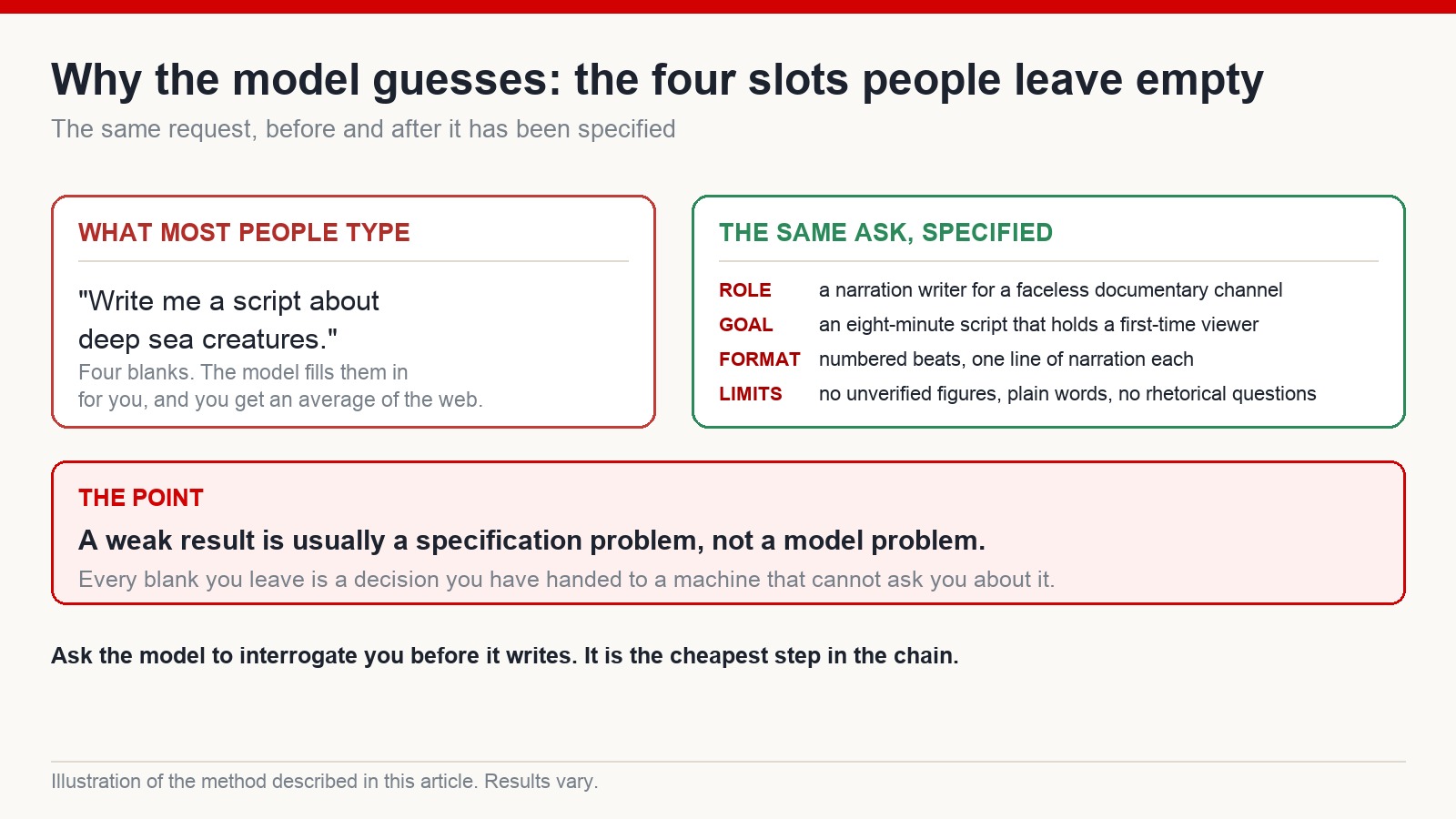
Writing a good prompt is a design job. Four things decide the output: who the model is being, what a good result would look like, the exact shape you want it in, and what must never appear. Leave any of them blank and the model fills it in for you – competently, generically, and not the way you would have.
“Write me a script about deep sea creatures” leaves all four blank. So the model picks an audience, a length, a structure and a tone, and hands you an average of everything on the internet about deep sea creatures. Then you conclude the tool is overrated.
The alternative is not one heroic prompt. It is a chain: break the build into steps with distinct jobs, and let each one close a different gap. That is what makes it repeatable, which matters more than any individual prompt.
The chain, end to end
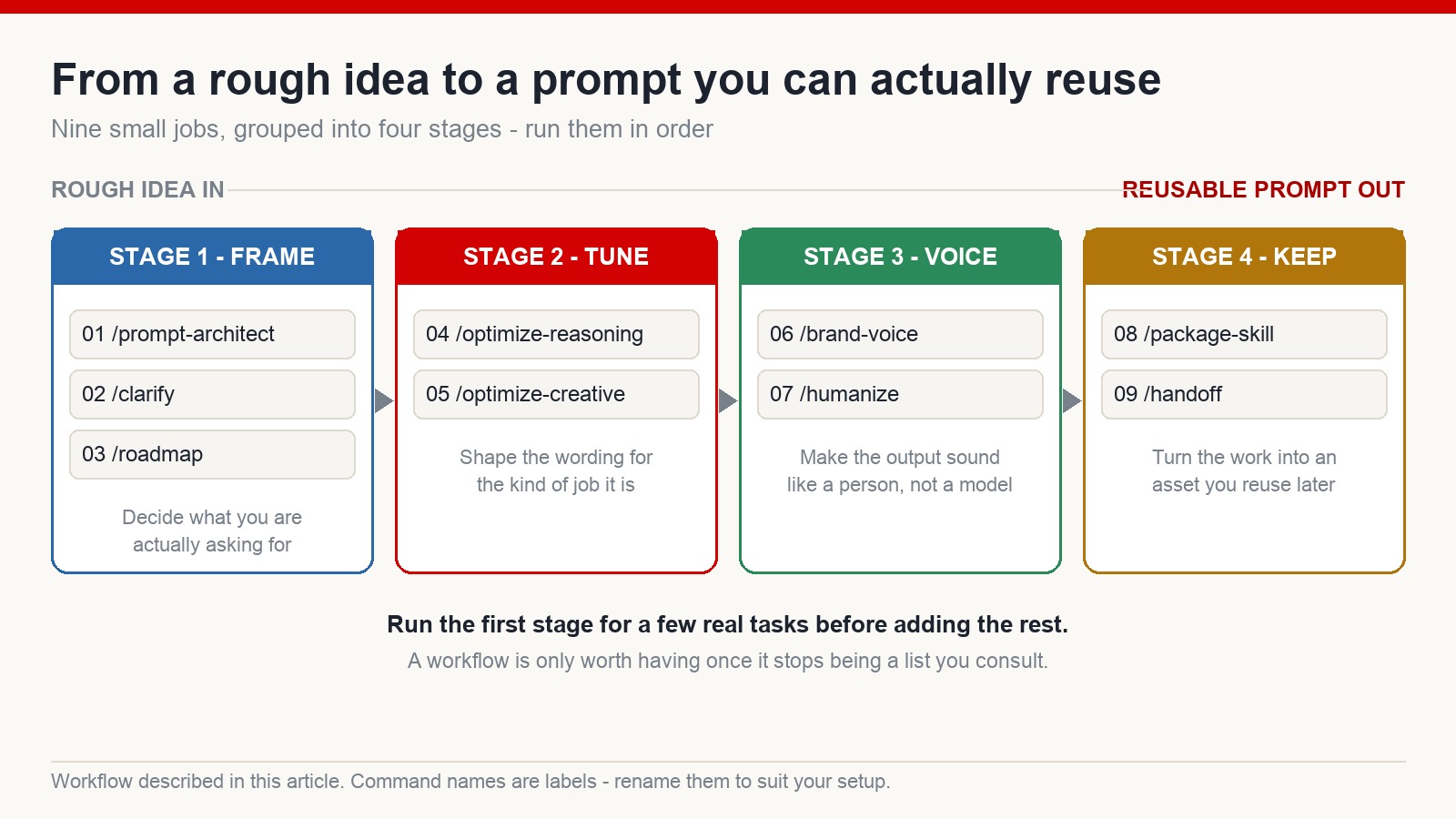
Rough idea to finished prompt runs: frame it (01-03), tune it for the kind of job (04-05), put your voice on it (06-07), then keep it (08-09). You can run the steps one at a time when you want control, or paste the whole set into your assistant’s instructions file and let it walk the chain in one pass.
Names in slashes below are just how I invoke them. Use whatever your tool calls them.
Stage 1: frame the problem (steps 01 to 03)
01 – /prompt-architect. You dump the mess in; it comes back as a specification.
You are a prompt architect. I am going to describe a task in messy, unfinished language. Do not attempt the task. Turn what I say into a specification with four headed sections: ROLE (who the model should be), GOAL (what a good result looks like, in one measurable sentence), OUTPUT (exact format, length and structure), CONSTRAINTS (what must never appear). Where I have not given you enough to fill a section, write UNKNOWN rather than inventing something. Here is the task:
02 – /clarify. The most skipped step and the most valuable one. Instead of starting with holes in the brief, you make the model interrogate you first.
Before you produce anything, interrogate me. Ask up to seven questions, one at a time, targeting only the gaps that would actually change the output. Skip anything you can reasonably infer, and tell me what you inferred so I can correct it. When no remaining question would change the result, say “specification complete” and restate the brief in under 120 words.
Most disappointing AI output is not the model being weak. It is the model guessing at the parts you left vague. Making it ask first is the cheapest way to avoid a full rewrite – the same reason a competent carpenter measures twice.
03 – /roadmap. For anything with more than one stage, get the order straight before you start.
Turn this brief into an execution plan for a person, not for a model. List the steps in the order they must happen. For each step give: what it produces, roughly how long it takes, and what makes it fail. Mark any step that depends on an earlier one. Flag the single step where most people abandon this kind of project. Keep it under one page.
Stage 2: tune for the kind of job (steps 04 and 05)
A prompt built for careful reasoning does not look like a prompt built for writing that has to sound alive. So the chain splits.
04 – /optimize-reasoning. For analysis, comparison, long documents, planning – work where being right beats sounding good.
Rewrite this prompt for a long-reasoning task where accuracy matters more than style. Front-load the goal, then the source material, then the constraints. Strip out flattery, hedging and stylistic instructions. Add one line instructing the model to state its assumptions explicitly and to answer “insufficient information” rather than guessing. Return only the rewritten prompt.
05 – /optimize-creative. For scripts, narration, hooks, stories – work where voice and rhythm carry the result.
Rewrite this prompt for a writing task where voice matters. Specify the reader, the emotional job of the piece, the pacing, and the vocabulary that is off limits. Replace quality adjectives such as “engaging” or “compelling” with concrete instructions the model can act on. Return only the rewritten prompt.
Stage 3: make it sound like you (steps 06 and 07)
These two are the difference between output that is technically correct and output anyone would want to read.
06 – /brand-voice. Give it evidence rather than adjectives. “Friendly but professional” means nothing; three samples of your actual writing mean a great deal.
Here are three samples of my writing. Do not summarise them. Extract a voice profile covering: typical sentence length and how much it varies, words I reach for, words I avoid, how I open, how I close, how I signal uncertainty, and how formal I am on a scale of one to ten. Then apply that profile to the draft below and show me only the rewritten draft.
07 – /humanize. Strips the machine signature off a draft.
Edit this draft to remove the signatures of machine writing. Specifically: delete any phrase that could open an article on any topic; break up the uniform sentence length; cut every list that exists only because lists are easy to generate; replace abstract claims with a concrete example or figure that I have supplied; and remove rhetorical questions used as transitions. Do not add facts I did not give you. Show the edited draft, then a short list of what you changed and why.
If you publish regularly – a blog, narration for a faceless channel, a newsletter – these two steps are the ones that earn their keep. They let you move at the speed of the tool without the output flattening into the same voice everyone else’s tool produces. A channel that sounds like a person with opinions holds an audience. A channel that sounds like a well-read machine does not, however accurate it is.
Stage 4: keep the work (steps 08 and 09)
08 – /package-skill. Turns tonight’s effort into something you never have to rebuild.
Turn the prompt we just finished into a reusable template. Replace everything specific to today’s task with a named placeholder in braces. List the placeholders at the top with a one-line description of each, and add a short note on when to use this template and when not to. Output plain text I can paste into a file.
09 – /handoff. For work that spans several sessions or several people.
Write a handoff note for whoever picks this up next – which may be me in a month. Cover: what we were trying to do, what has been decided and should not be reopened, what is still unresolved, what was tried and rejected and why, and the exact next action. Maximum 300 words, no pleasantries.
A worked example, start to finish
Say the rough idea is “a video about creatures that live in the deep ocean”. Run 01 and you get a specification with ROLE and OUTPUT filled and GOAL marked UNKNOWN, because you never said what the video is for. Run 02 and the model asks who the video is for, how long it should be, whether the footage is licensed or generated, and whether you want facts sourced. You answer four questions in about ninety seconds.
Now the brief reads: narration writer for a faceless documentary channel; eight-minute script that keeps a first-time viewer past the two-minute mark; numbered beats with one line of narration each; no figures that cannot be sourced, plain words, no rhetorical questions. Run 05, because this is a voice job. Run 06 against three of your own scripts. Run 07 on the draft. Run 08 and you now own a template that produces the same standard next Tuesday without any of the thinking being repeated.
The whole chain takes maybe fifteen minutes the first time. It takes two minutes every time after that, which is the actual argument for it.
Start with three, not nine
Do not attempt all nine on your first task. Run the framing three – architect, clarify, roadmap – on a handful of real jobs until they are reflex, then add the tuning and packaging steps. A workflow only becomes valuable at the point where you stop consulting it as a list.
A good prompt does not think for you
One line worth keeping: a good prompt does not replace your thinking, it just lets you move faster. The chain will structure the request and preserve your voice. It will not choose your direction, judge whether the answer is any good, or supply the experience that makes a piece worth reading. That part stays yours, and it is also the part that determines whether anything you publish is worth someone’s time.
Treat this as leverage on the mechanical half of writing prompts, not as a machine that thinks on your behalf. If you want a structured English-language path for building a faceless channel – process and practice rather than promises about views or income – that is what I run at mmoyoutube.com.
Do these prompts only work with one particular AI assistant?
No. They are plain instructions, not product features, so they work in any of the major chat assistants. The only thing that changes between tools is how you store and invoke them – some let you save named commands, others need you to paste the text. The wording itself carries over unchanged.
Which step matters most if I only adopt one?
The clarify step, by a wide margin. Nearly every disappointing answer traces back to a question the model could not ask you, so it guessed instead. Forcing it to interrogate you first costs about a minute and removes most of the rework.
Will the humanize step make AI text undetectable?
That is not what it is for, and I would not promise it. It removes generic openings, uniform sentence rhythm and filler lists so the draft reads like something a person wrote. What actually makes writing sound human is having something specific to say – an opinion, an example, a number you personally measured. The prompt cannot supply that; you have to.
Is this overkill for a simple question?
Completely. If you want a quick fact or a one-line rewrite, just ask. The chain earns its time on work you will repeat: scripts, briefs, descriptions, anything that has to hit a consistent standard week after week.
How do I stop rebuilding the same prompt every month?
Run the packaging step the moment a prompt works. Replace the task-specific parts with named placeholders, save it as a file, and note underneath when it should and should not be used. Almost nobody does this, which is why almost everybody starts from an empty box every time.



